
Finance, GST & Accounting · GST
TDS
Track TDS both ways in Sayl Finance - what customers deduct from your invoices and what you deduct from vendor bills - and deposit it with a challan.
What it is for
TDS (tax deducted at source) moves in two directions, and this one page keeps both. When a customer pays you less because they deducted TDS, that money is not lost - it is tax paid on your behalf, which you claim back. When you pay a vendor, you deduct TDS from their bill and must deposit it with the government.
The four boxes at the top answer the questions that matter: how much customers deducted, how much of it is in your books, how much you deducted from vendors, and how much of that you still have to deposit.
How it works
- TDS deducted BY A CUSTOMER is entered on the invoice, at the moment you record their payment: the amount that reached your bank, plus the TDS they kept back, with its section. Together they settle the invoice in full. The TDS part goes to the TDS Receivable account and appears here under Deducted by customers.
- TDS deducted BY YOU is chosen on the vendor's bill (the TDS to deduct box). It is booked when you open the bill, so the vendor is owed only the net amount. It goes to TDS Payable and appears here under Deducted by us, marked Not deposited.
- TDS is always worked out on the taxable value - the amount before GST. A ₹10,000 + 18% GST bill (₹11,800) at 2% has ₹200 of TDS, not ₹236.
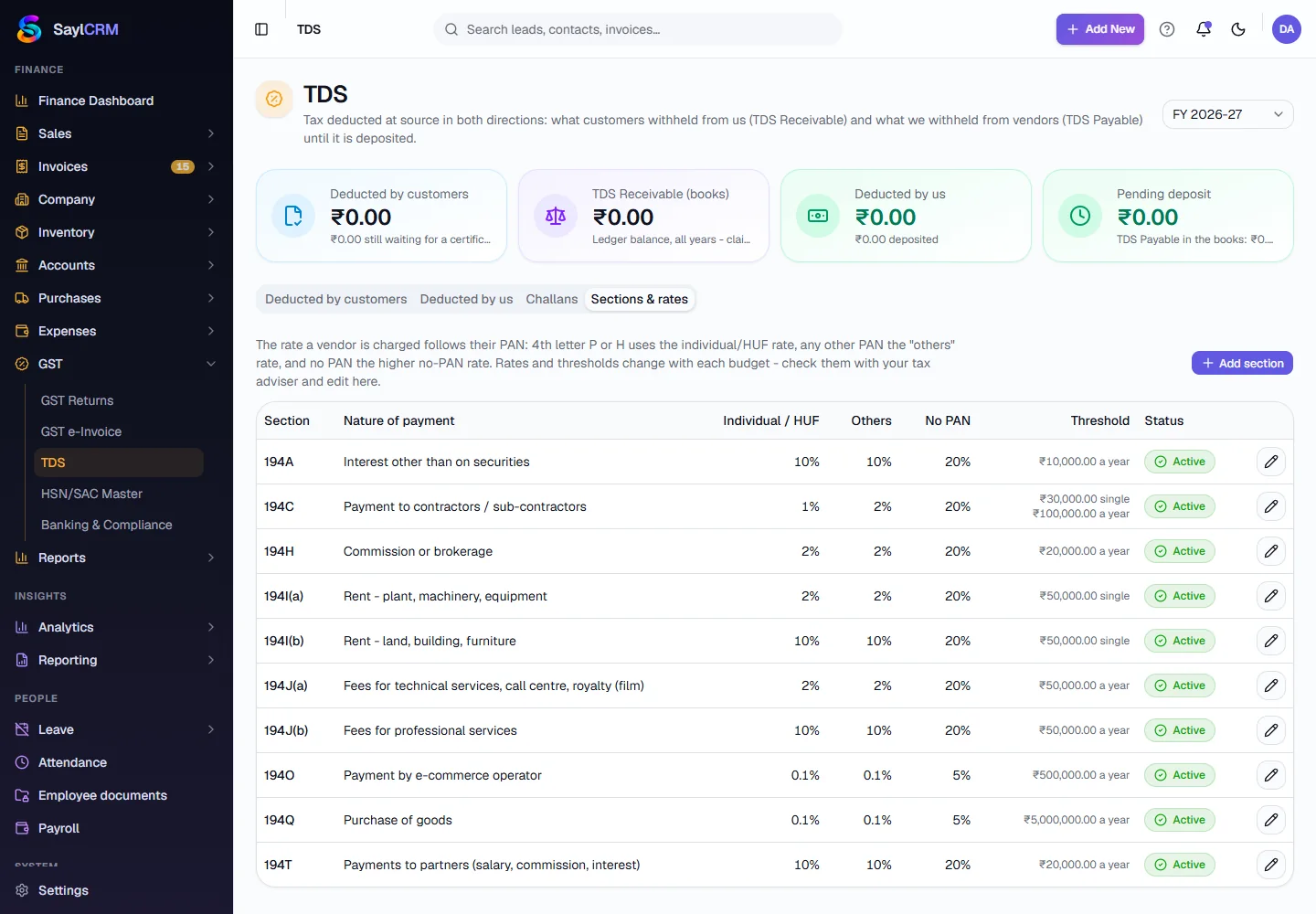
- The rate depends on the section and the vendor's PAN: the 4th letter P or H (individual or HUF) uses the individual rate, any other PAN the 'others' rate, and no PAN at all the higher no-PAN rate (20% for most sections).
- Depositing is done with a challan: tick the deductions you paid to the government, record the challan, and they are marked Deposited. Pending deposit drops to zero when everything is paid.
Step by step
Every screenshot is from the live demo. The highlighted button is the one to click - nothing here is saved in the demo, so you can follow along freely.
- 1
Where to start
In the guides menu on the left, open GST and click TDS. In Sayl itself the same page is in the left menu under Finance → GST → TDS. Pick the financial year at the top right; the boxes and lists follow it.
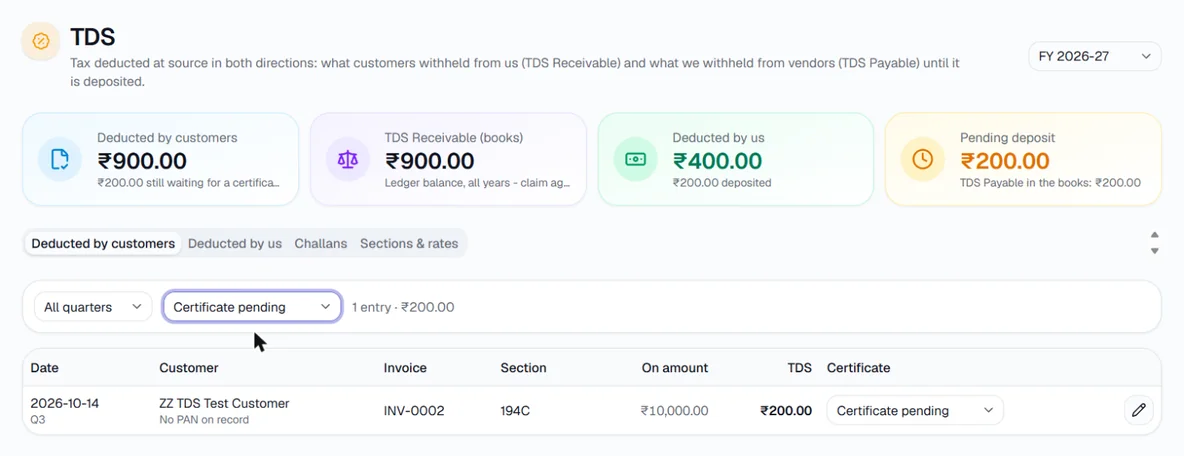
The TDS page. Here the Deducted by customers list is filtered to Certificate pending. - 2
TDS deducted by a customer - record it on the invoice
Open the invoice the customer paid and go to Record a payment. In the first box enter only what reached your bank. In TDS deducted enter the amount they kept back - a Section box then appears; type the section printed on their TDS certificate, for example 194J(b) for professional fees or 194C for contract work. Click Record.
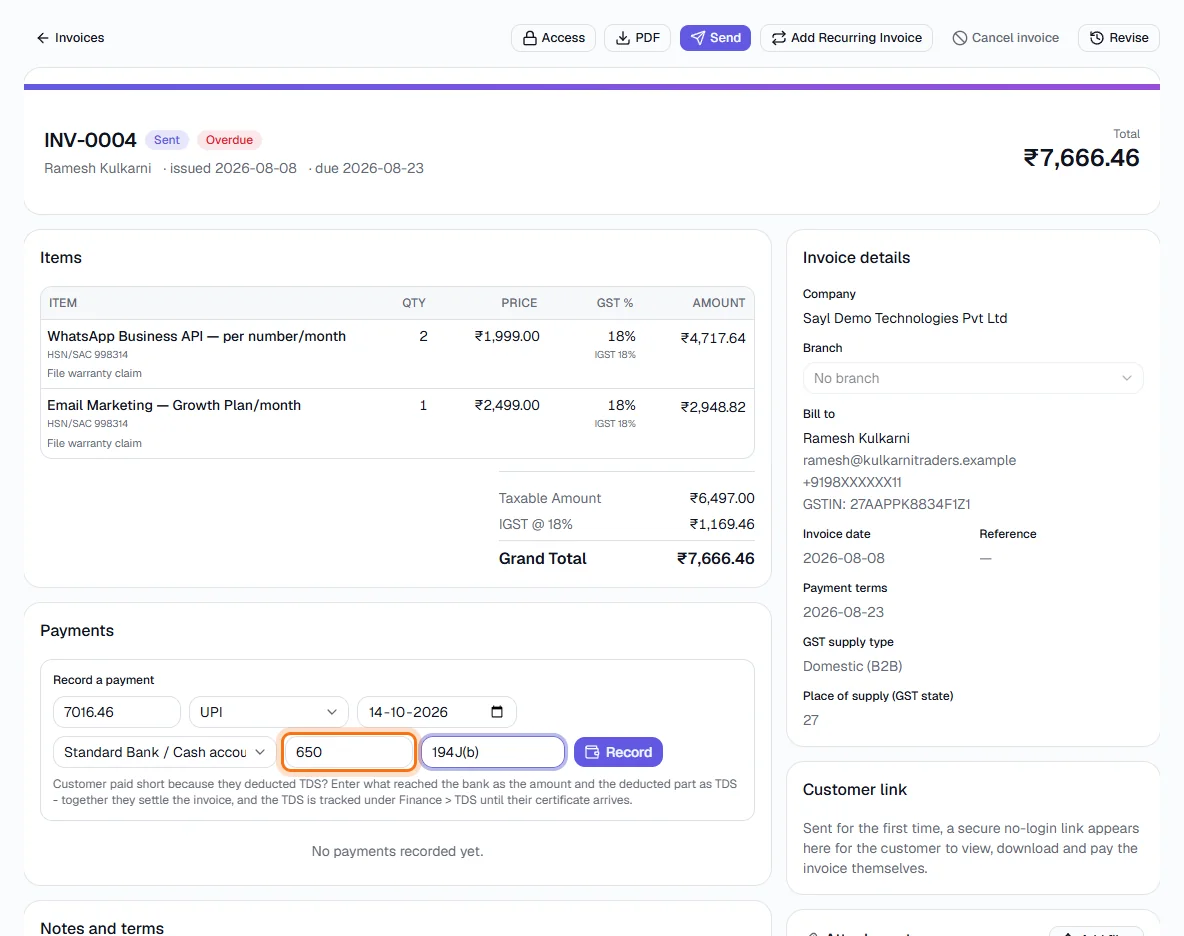
Invoice of ₹7,666.46 (taxable ₹6,497). The customer deducted 10% under 194J(b) = ₹650, so ₹7,016.46 reached the bank. - 3
Check that the invoice is fully paid
The invoice now shows two payment lines - the bank amount and 'TDS deducted' - and a balance of ₹0. The GST on the invoice does not change: TDS reduces what the customer pays you, not the GST you owe.
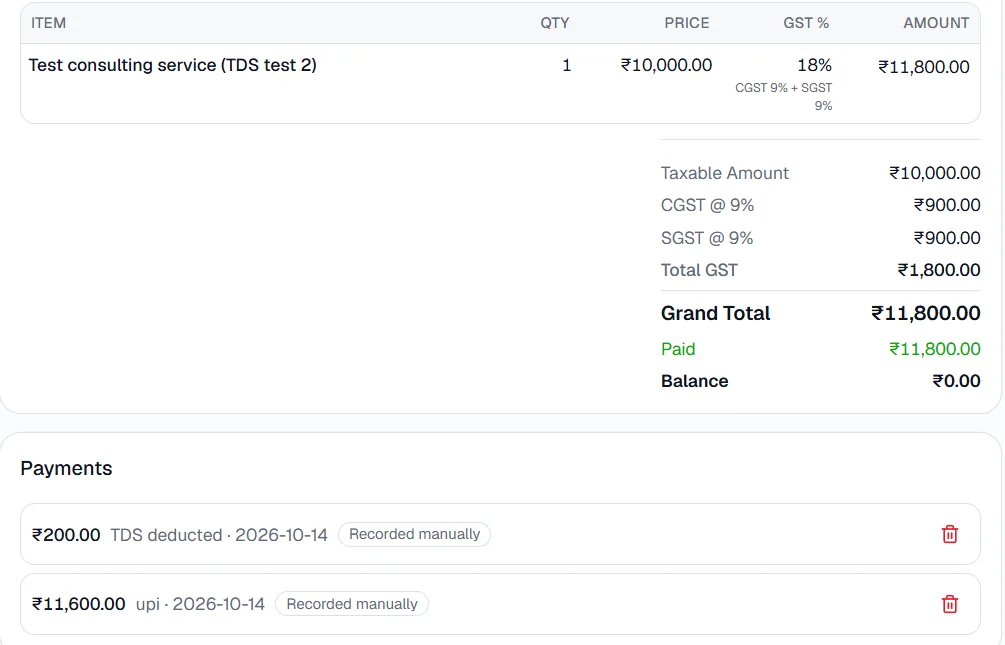
₹11,600 received + ₹200 TDS deducted = ₹11,800 settled. Balance ₹0. - 4
Follow up the customer's TDS certificate
Under Deducted by customers every deduction is listed with the customer, invoice, section and amount. When the customer sends Form 16A, change Certificate to 'Form 16A received'. After you check it in Form 26AS on the income-tax site, change it to 'Matched in 26AS'. The note under the first box shows how much is still waiting for a certificate.
- 5
TDS deducted by you - see what you owe the government
Open Deducted by us. Every bill where you deducted TDS is listed with the vendor, their PAN, the bill, the section and rate, and the amount. 'Not deposited' means you still have to pay it to the government; 'Deposited' shows the challan it was paid with. To see how TDS is chosen on a bill, read the Bills guide.
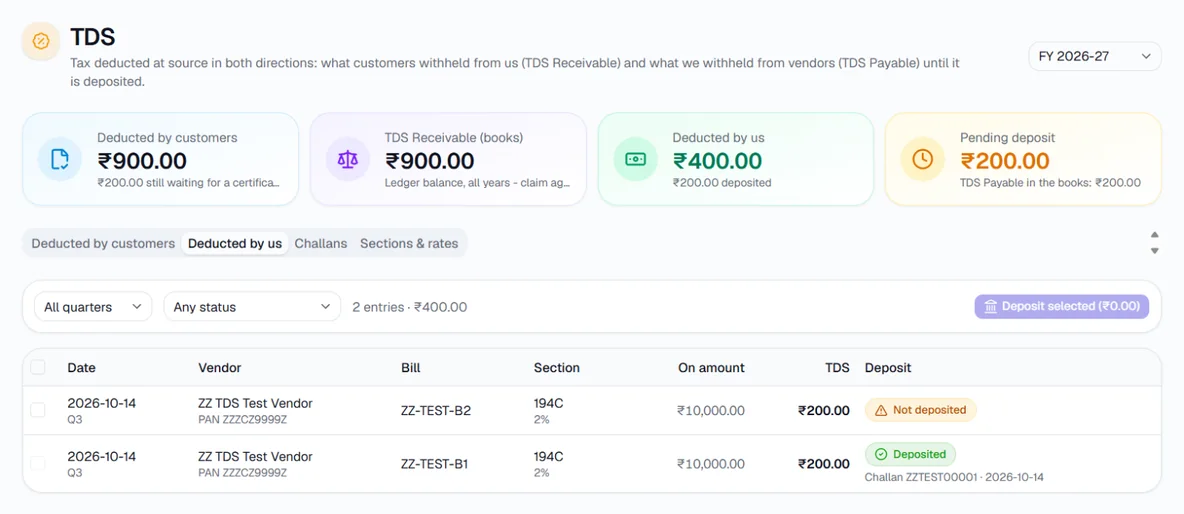
Two bills with 194C at 2%: one already deposited (challan shown), one still to deposit. - 6
Deposit TDS - select the deductions
Tick the deductions you have paid to the government (or the box in the header to tick everything pending). The Deposit selected button shows the total. Click it.
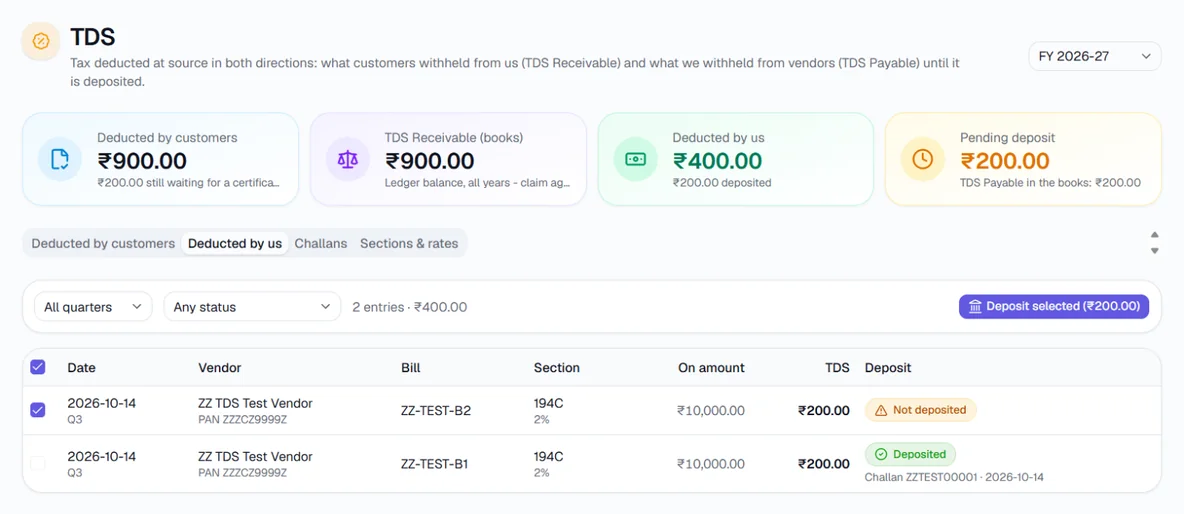
One deduction of ₹200 ticked - Deposit selected (₹200.00). - 7
Deposit TDS - record the challan
Enter the date you paid, the bank account it was paid from, the challan serial number (or CIN) and the BSR code exactly as printed on the challan. Add interest or a late fee only if you paid one. 'Total leaving the bank' is what will come out of that account. Click Record challan.
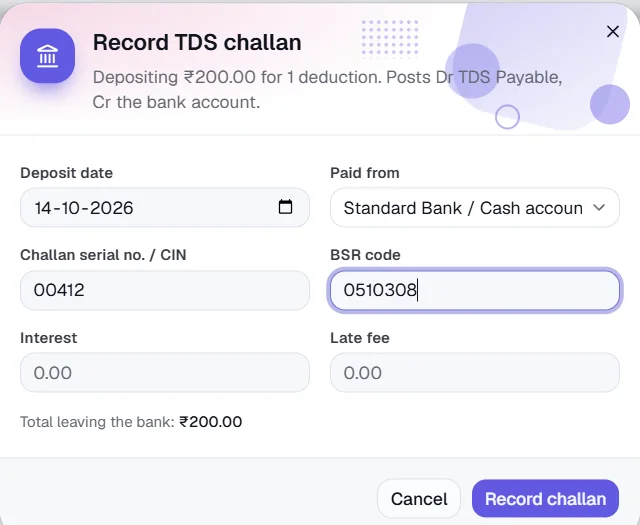
Record TDS challan: the tax, plus any interest or late fee, leaves the chosen bank account. - 8
Check the challan
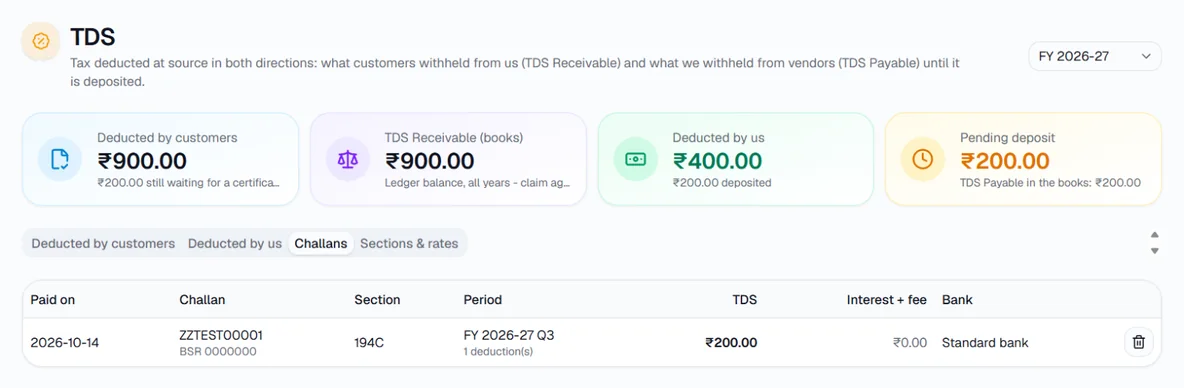
The deductions are now marked Deposited, Pending deposit goes down, and the Challans tab lists the challan with its section, quarter and amount. If you entered a challan by mistake, delete it here - the deductions go back to Not deposited.
- 9
Check the sections and rates
Sections & rates lists every TDS section with its rate for individuals/HUF, for others and without a PAN, and its threshold. Rates change with the budget - confirm them with your tax adviser and edit any line with the pencil button. Add section adds one that is missing.
Key fields
- Amount (on the invoice payment)
- Only what actually reached your bank - not the invoice total.
- TDS deducted
- What the customer kept back as TDS. The amount plus the TDS settles the invoice.
- Section
- From the customer's TDS certificate, e.g. 194C, 194J(b), 194H.
- Challan serial no. / CIN, BSR code
- Exactly as printed on the challan you paid - you need them for your TDS return.
- Interest / Late fee
- Only if you paid late. Booked as an expense, not as TDS.
Tips
- TDS is on the amount before GST. If a customer deducted it on the GST-inclusive total, ask them to correct it.
- Record the TDS when you record the payment - not later - so the invoice is settled the same day it is paid.
- Deposit each month's TDS by the 7th of the next month to avoid interest.
- TDS and advances work in rupees only; a foreign-currency invoice or bill cannot carry TDS.