
Finance, GST & Accounting · Purchases
Vendor Advances
Record money paid to a supplier before their bill arrives, and let Sayl take it off their next bill automatically.
What it is for
A vendor advance is money you pay a supplier before you have their bill - a booking amount or a deposit. Sayl keeps it as Advances to Vendors (money the supplier owes you back in goods or services) and takes it off the vendor's next bill automatically.
How it works
- When you open the vendor's next bill, unused advances are applied oldest first. The bill shows an 'Advance applied' payment line, and only the rest is left to pay.
- TDS on the bill still works as usual: a ₹11,800 bill with ₹200 TDS and a ₹5,000 advance leaves exactly ₹6,600 to pay.
- Turn off 'Apply automatically' to keep an advance for a particular bill and apply it by hand from that bill. Money that will not be used can be marked as refunded to you.
Step by step
Every screenshot is from the live demo. The highlighted button is the one to click - nothing here is saved in the demo, so you can follow along freely.
- 1
Where to start
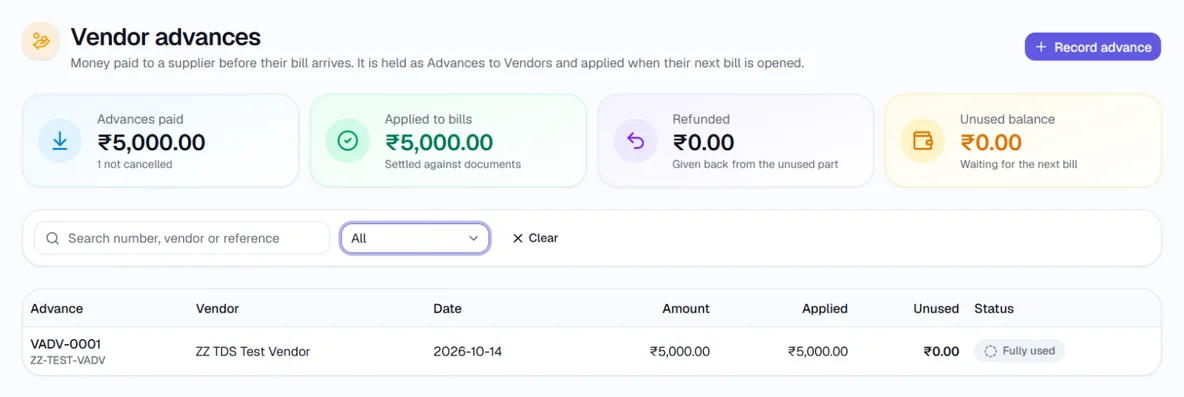
In the guides menu on the left, open Purchases and click Vendor Advances. In Sayl the page is under Finance → Purchases → Vendor Advances. Switch the filter to All to see advances that are already used.
- 2
Record the advance
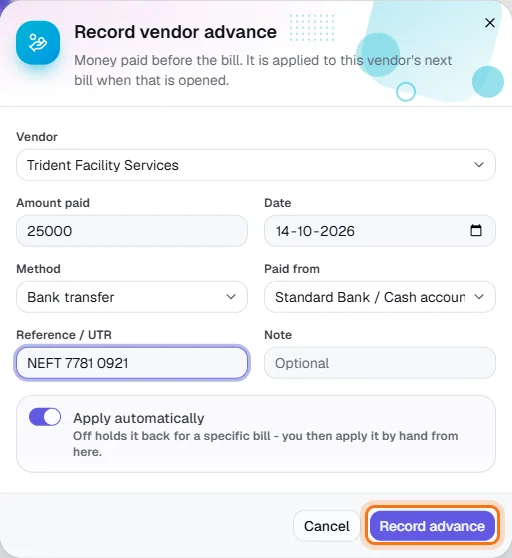
Click Record advance. Choose the vendor, enter the amount paid, the date, how you paid and which bank account it came from, and the UTR or reference. Leave Apply automatically on. Click Record advance.
- 3
Open the vendor's next bill
Create the bill and open it as usual (see the Bills guide). The advance is applied at once. In the bill's Payments you see 'Advance applied (VADV-…)', the TDS deducted if any, and the balance left to pay.

Bill ₹11,800: advance ₹5,000 + TDS ₹200 applied automatically; the remaining ₹6,600 paid by bank transfer. - 4
Check the advance
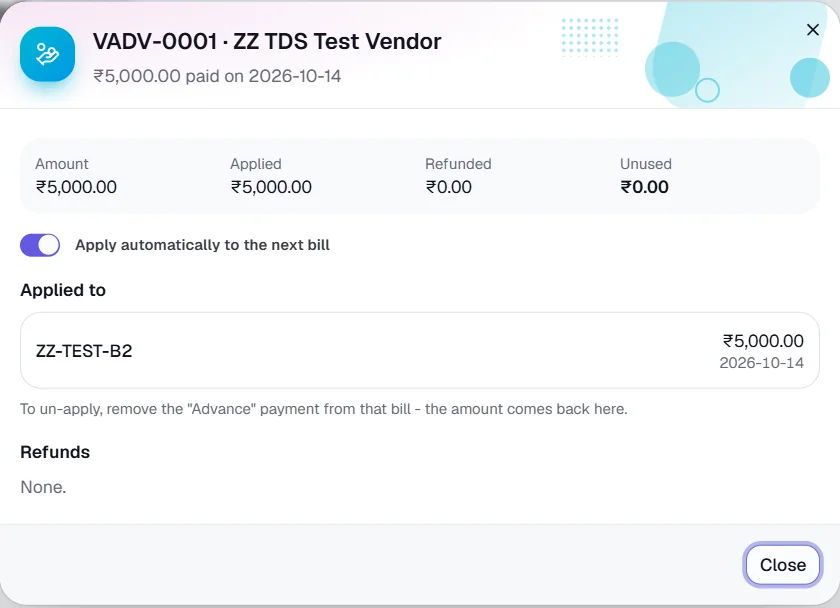
Click the advance on this page: Applied to lists the bill and the amount used, and Unused drops to zero once it is fully used.
- 5
Refund or cancel
Refund unused records money the vendor paid back to you. Cancel advance removes one entered by mistake; remove it from any bill first.
Key fields
- Amount paid
- What you paid the vendor in advance.
- Paid from
- The bank or cash account the money left.
- Apply automatically
- On: used by the vendor's next bill. Off: held for a bill you choose.
Tips
- Advances are applied when a bill is opened, not when it is saved as a draft - check the draft's total before you open it.