
Finance, GST & Accounting · GST
Banking & Compliance
See which bank and government connections are available, what each one needs, and whether your books are ready for it.
What it is for
Banking & Compliance is the map of live links between Sayl and banks and the GST, tax and company-law portals - live bank feeds, e-invoicing and e-Way Bills, GST return filing, the Income Tax portal, TDS returns, MCA, EPFO and ESIC.
None of them is connected yet, and the page says so plainly. Each one needs registration or credentials that cannot be faked, so nothing here sends anything to a portal. What it does is show what already works and what to fix so you are ready the day a connection opens.
How it works
- Each connection shows its status (Not connected), what it would do, and what it needs - usually a partnership on our side and your approval.
- Under Your books are ready for this, a checklist shows what you already have: a bank account set up, a statement imported, your GSTIN, HSN codes on your goods, a TDS Payable account.
- What works today names the feature that does the job in the meantime, such as uploading a bank statement and reconciling it, or the GST return workpapers.
- I need this tells us you want the connection, so we know which to build first.
Step by step
Every screenshot is from the live demo. The highlighted button is the one to click - nothing here is saved in the demo, so you can follow along freely.
- 1
Open Banking & Compliance
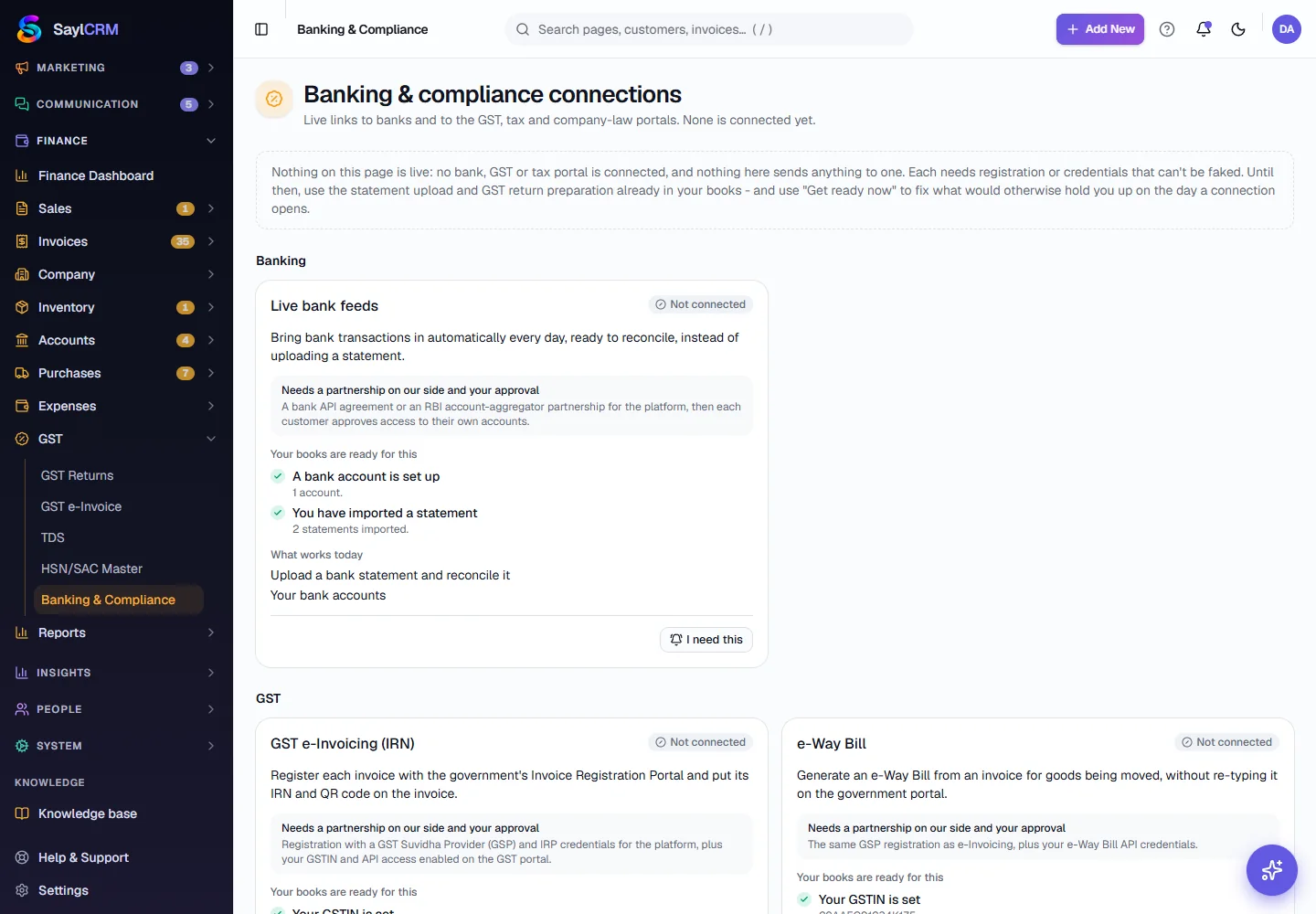
Finance → GST → Banking & Compliance. The top says that nothing on the page is live. The first group is Banking, with Live bank feeds. Under GST are e-Invoicing, e-Way Bill and GST return filing, and under Direct tax and registries the Income Tax portal, TDS returns, MCA, EPFO and ESIC.
- 2
Read a connection card
Each card says what the connection would do, what it needs on our side and yours, and what is already ready in your books - for example that your GSTIN is set and that all your goods have an HSN code.
- 3
Fix what is missing
If the checklist shows something missing, fix it now - add a bank account, set the GSTIN in your company settings, give goods their HSN codes - so you are ready the day the connection opens.
- 4
Use what works today
Use the feature named under What works today: upload a bank statement and reconcile it, prepare GSTR-1 and GSTR-3B data for your accountant or the GST portal, and track TDS in your chart of accounts.
- 5
Tell us what you need
Click I need this on a connection you want. It records your interest so the most wanted connections are built first.
Key fields
- Status
- Whether the connection is live. Today every one is Not connected.
- Needs
- What has to exist before it can be connected, on our side and on yours.
- Your books are ready for this
- A checklist of what you already have set up.
- What works today
- The feature that does the job until the connection is live.
Tips
- Use the checklists as a to-do list for your books - they are things you will need for filing anyway.
- For e-invoicing, practise in the sandbox on the GST e-Invoice page while the live connection is not available.
- Tell us which connection matters most to you with I need this.